Product Overview
The ESP32-S3 LCD board is a compact development platform built for embedded UI work, touch-driven controls, and small IoT interfaces. For buyers who need to combine wireless microcontroller logic with a front-facing display, this type of board solves a common problem: it reduces the number of separate parts needed for prototyping, wiring, and interface testing. Instead of pairing a controller, display, and header breakout on a breadboard, the board integrates a 1.47-inch touch screen and an ESP32-S3 platform into one module that is easier to mount, power, and evaluate.
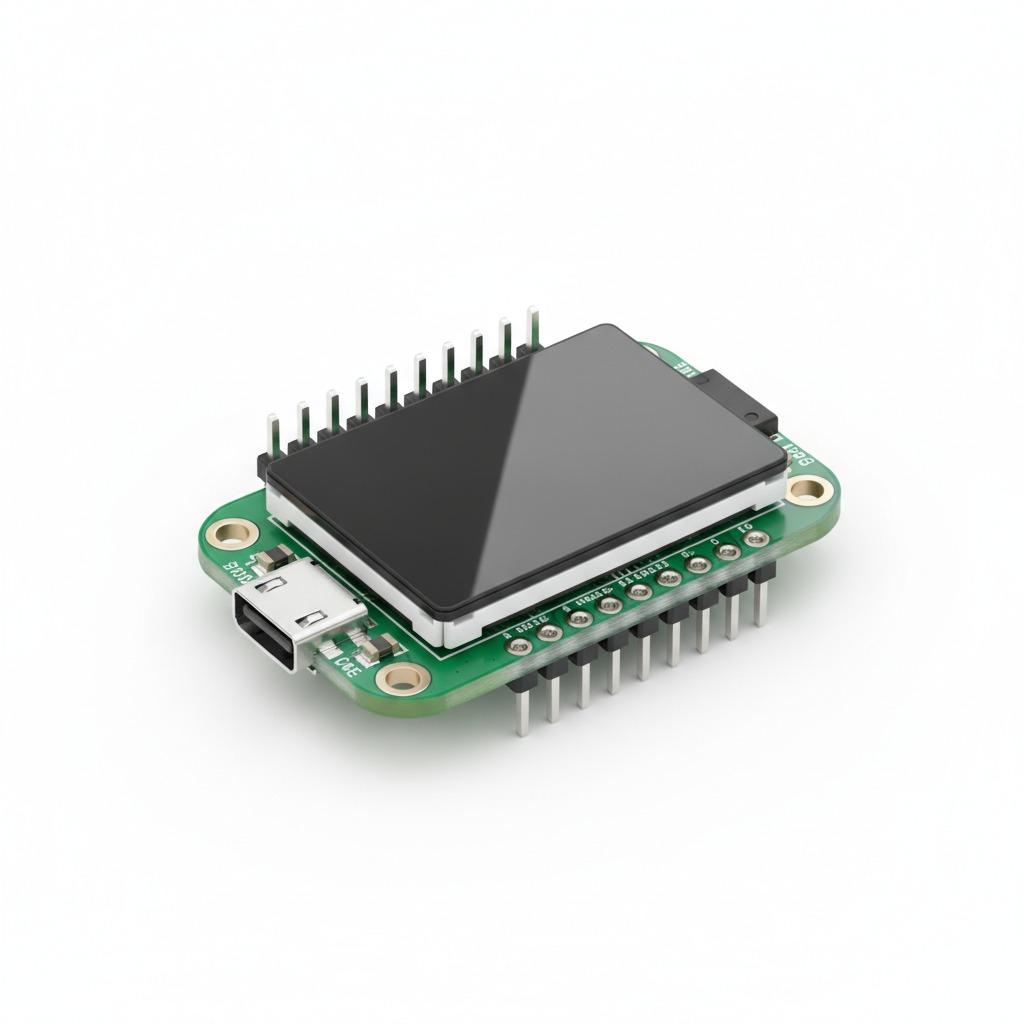
In the product image, the board appears as a rounded-rectangle module with a dark bezel, a glossy display surface, pre-soldered pin headers, and a USB-C connector for power or programming. Those visible details make it suitable for quick development cycles where the appearance, physical layout, and connection method matter as much as the firmware itself.
What This Board Is Designed to Do
This class of ESP32-S3 development hardware is intended for human-machine interface projects and compact IoT control panels. A 1.47 inch LCD development board is large enough to show status text, icons, menus, and sensor values, while still remaining small enough for handheld devices or space-constrained enclosures. Because the ESP32-S3 family is commonly used for connected embedded applications, the board fits naturally into firmware development for dashboards, buttonless interfaces, and local control screens.
Buyers often evaluate an ESP32-S3 IoT display board when they need a prototype that can present live data from sensors, switch settings through a touch surface, or demonstrate a product concept without building a custom PCB first. It can also serve as a reference design for product teams planning a more specialized final assembly.
Visible Structure and Practical Capabilities
Compact module layout
The visible structure suggests a finished board assembly rather than a bare microcontroller breakout. The screen dominates the front face, which is helpful for menu navigation and status display. The pre-installed pin headers simplify bench testing and make it easier to integrate with external wiring during development.
USB-C connection for development workflow
A USB-C port is visible on the board, which is a useful feature for modern prototyping setups. In many embedded workflows, USB-C simplifies power delivery and programming connections, especially during repetitive firmware updates. For engineers testing a 1.47 inch ESP32-S3 capacitive touch screen concept, this reduces friction during bring-up and user-interface iteration.
Touch-centered interaction
The board is described as a touch display module, but the exact touch technology is not confirmed from the image alone. That means buyers should confirm whether the screen is capacitive or another touch style before locking in software assumptions. Even with that uncertainty, the form factor is clearly aimed at touch-based interaction rather than button-only control.
Materials, Finish, and Build Characteristics
From the supplied information, the board likely combines a fiberglass PCB substrate, a black plastic bezel or frame, a glossy display cover, and metal header pins. These are standard construction elements for compact electronics modules and support a neat, enclosed appearance. The rounded corners and low-profile shape make the board easier to fit into front panels or handheld enclosures.
Exact PCB surface finish, display cover material, and panel type are not visible, so they should not be assumed. If a buyer needs a specific optical stack, such as IPS, TFT, or OLED, that detail must be verified with the supplier before order placement.
Manufacturing and Assembly Considerations
This product category typically involves PCB fabrication, SMT assembly, display integration, and through-hole pin-header soldering. For a manufacturer such as hcdpcba, the value is not only in assembly volume but in process control across the whole chain: board fabrication, component placement, reflow, connector installation, and test. That matters because a board with a screen and USB interface has more assembly touchpoints than a basic microcontroller module.
When preparing a custom version, buyers should plan early for the physical interface, header orientation, screen opening, and firmware flashing method. Small differences in connector placement or bezel geometry can affect enclosure fit, especially in compact products.
Typical Application Scenarios
This module is well suited for smart home controllers, portable instruments, sensor dashboards, test fixture interfaces, and product demos. In each case, the display helps replace external indicators with a local visual layer, while the ESP32-S3 handles control logic and connectivity. Developers also use this kind of board for firmware validation, since UI changes can be tested quickly without manufacturing a custom front panel.
For teams evaluating an ESP32-S3 IoT display board, common questions include whether the screen is readable at the intended viewing distance, how much space remains for the enclosure, and whether the input method is comfortable for repeated use. Those practical points often matter more than raw headline specs during prototype selection.
Quality Control and Buyer Checks
At the module level, quality control should focus on solder joint consistency, header alignment, USB port seating, screen mounting, and basic power-up behavior. A display board that passes visual inspection but has weak connector joints can create intermittent faults during testing, so electrical continuity and assembly inspection are both important. If production quantities are needed, buyers should also define incoming inspection criteria for screens, headers, and assembled boards.
For sourced assemblies, hcdpcba can support PCB fabrication, SMT placement, assembly, component procurement, and testing. That combination is useful when the buyer wants one supplier to manage both board-level production and integration support.
Customization Guidance
Custom options for a 1.47 inch LCD development board often start with connector style, header placement, enclosure requirements, PCB color, labeling, and firmware loading support. In some projects, the display bezel may need to match a front panel cutout, or the USB-C location may need to align with the final housing. Buyers should also define whether they need assembly-only service, turnkey sourcing, or OEM/ODM support from concept to production.
If your project depends on a specific display technology or touch behavior, share the requirement early. The term ESP32 S3 capacitive touch screen is often used in search, but the actual touch implementation must be confirmed by drawing, sample, or specification sheet before mass production.
How to Decide If This Board Fits Your Project
Choose this board if your priority is rapid prototyping, compact integration, and a direct path from firmware testing to user-interface validation. It is especially useful when you want to reduce wiring complexity and evaluate how a small touch display behaves in a real device layout. If you need a larger screen, a different connector set, or a confirmed panel specification, those requirements should be checked before purchase.
For quote requests, prototype support, or customized PCB assembly around this ESP32-S3 LCD board platform, contact hcdpcba at +86 18924624188. Sharing your enclosure size, interface needs, and expected production volume will help the team recommend a practical build plan.